
Download RS Email Verifier – email verifier, bulk email verification, email list cleanup, email validation tool, email address checker
Overview
RS Email Verifier is a specialized productivity tool designed for professionals engaged in bulk email marketing campaigns. Its primary function is to validate large volumes of email addresses, ensuring that only active and correctly formatted contacts remain in a mailing list. By eliminating invalid, syntactically incorrect, or non-responsive email addresses, the software helps users reduce bounce rates and improve campaign deliverability. This is particularly valuable for marketers, email service providers, and businesses relying on direct email communication for outreach or customer engagement.
The application is developed by RS Tools, a company focused on utility software for digital communication tasks. Although specific details about the company’s broader portfolio were not provided, the tool’s design reflects a targeted approach to solving common pain points in email marketing workflows. Real-world use cases include preparing mailing lists before launching promotional campaigns, auditing existing databases for outdated entries, and maintaining clean contact records to comply with email service provider policies.
Within the productivity app ecosystem, RS Email Verifier fills a niche role by offering technical validation beyond basic formatting checks. Its integration of SMTP-level testing and domain verification aligns with the standards used by major ISPs, making it a reliable option for users who prioritize list accuracy and campaign performance. While the tool is not a mobile app, its functionality remains relevant for desktop-based email management workflows.
Key Features & Functionality
- Email Syntax Check: Automatically scans imported email addresses for correct formatting. Addresses with invalid structures—such as missing @ symbols or incorrect domain parts—are flagged and removed, preventing early-stage delivery failures.
- Domain Availability Verification: Checks whether the domain part of each email address is active by querying DNS records. Domains that fail to resolve are marked as invalid, helping users identify obsolete or discontinued email services.
- SMTP Connectivity Test: Attempts to establish a connection with the target mail server’s SMTP service. This step verifies that the server is operational and accessible, which is essential for confirming the potential to deliver messages.
- Message Simulation: After a successful SMTP connection, the tool simulates sending a message to test mailbox existence. This non-intrusive method reduces the risk of triggering spam filters or bouncebacks during actual campaigns.
For example, a marketing manager preparing a quarterly newsletter can import a list of 10,000 contacts and use RS Email Verifier to clean the list before sending. The tool would identify and remove 1,200 invalid entries, significantly improving deliverability. Similarly, a small business owner maintaining a customer database can use the software to audit outdated emails, ensuring that future communications reach active recipients.
Interface, UX & Performance
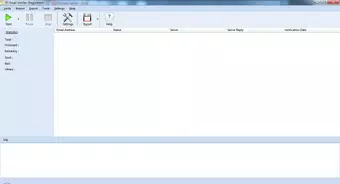
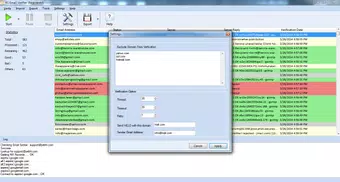
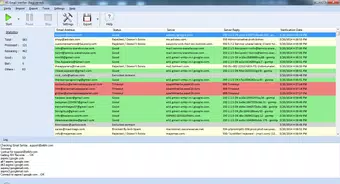
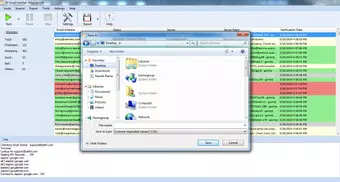
RS Email Verifier features a straightforward desktop interface designed for efficiency and clarity. The layout emphasizes workflow progression: import, validate, review, and export. Users can drag and drop email lists into the application, with real-time feedback on validation status. The visual design is minimalistic, focusing on functionality rather than decorative elements, which aligns with its utility-focused purpose.
Navigational flow is linear and intuitive, guiding users through each stage of the verification process. Common actions—such as starting a scan or exporting results—are accessible via clearly labeled buttons. Although the developer did not list formal performance metrics, the tool’s lightweight file size of 4.3 MB suggests optimized resource usage, which likely contributes to responsive operation on standard Windows systems.
Stability appears to be a key design consideration, given the tool’s long-standing presence since 2014. The application runs without requiring additional software dependencies, reducing the risk of crashes or conflicts. While the developer did not specify compatibility with modern Windows versions, its continued availability indicates a degree of backward compatibility. Users on older or low-resource systems may benefit from its low footprint and predictable behavior.
Platform Compatibility & Technical Requirements
RS Email Verifier is designed for the Windows operating system. The current version is 1.0.0, with a file size of 4.3 MB. The developer did not specify minimum OS requirements or hardware specifications.
Given the app’s release date in 2014 and its lightweight nature, it may run on older Windows editions such as Windows 7 or 8. However, compatibility with newer versions like Windows 11 or Windows 10 was not confirmed. Users should verify system compatibility before installation. No mobile or cross-platform support is available, as the application is strictly a desktop tool.
Pros and Cons
Pros
- Efficient bulk email validation with multiple verification layers
- Low file size and minimal system resource usage
- Supports critical checks: syntax, domain, SMTP, and mailbox simulation
- Designed for professional email marketers and database managers
- Cost-effective for one-time or periodic list cleanup tasks
Cons
- Not available for mobile or macOS platforms
- Price point of $29.95 may be high for casual users
- No public information on update frequency or future development plans
- Requires port 25 access for full functionality, which may be blocked on some networks
- Interface lacks advanced customization or reporting features
FAQ
Is RS Email Verifier safe to download and use?
Yes, the application is designed for legitimate email validation purposes. As with any software, users should download it from official sources to avoid tampering.
Can I use RS Email Verifier on Windows 10 or Windows 11?
While the developer did not specify compatibility, the app’s lightweight design suggests it may work on modern Windows versions. Users should test it in a secure environment if unsure.
Does RS Email Verifier require an internet connection?
Yes, the tool requires an active internet connection to perform DNS lookups, SMTP tests, and mailbox simulations.
How often should I verify my email list?
It is recommended to verify lists before major campaigns and periodically—such as every 6 to 12 months—to maintain data accuracy.
Is RS Email Verifier suitable for personal use?
While primarily designed for professional use, individuals managing large personal mailing lists may find it useful for cleanup and organization.
Final Thoughts
RS Email Verifier remains a reliable tool for professionals who depend on accurate email delivery. Its layered validation process—spanning syntax, domain, SMTP, and mailbox simulation—offers a robust defense against bouncebacks and list degradation. While its desktop-only availability and single-platform support limit accessibility, its focused functionality delivers tangible value for email marketers and database administrators.
For users managing bulk email campaigns, the investment in RS Email Verifier can lead to improved sender reputation, higher open rates, and reduced risk of being flagged as spam. Despite its age and lack of recent updates, the tool continues to serve its core purpose effectively.
Download RS Email Verifier now


